A Lightweight Debugging Toolkit for WooCommerce Developers & Managers
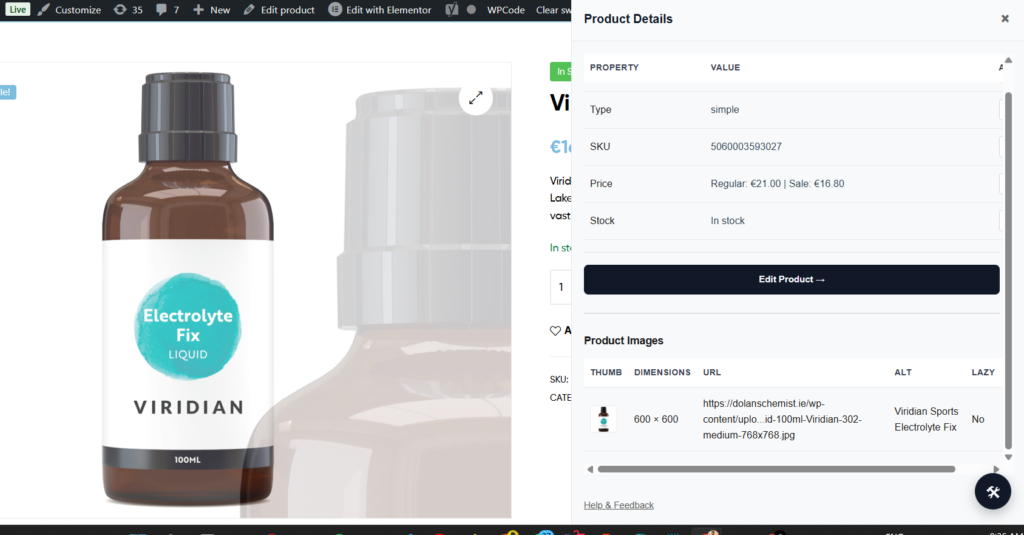
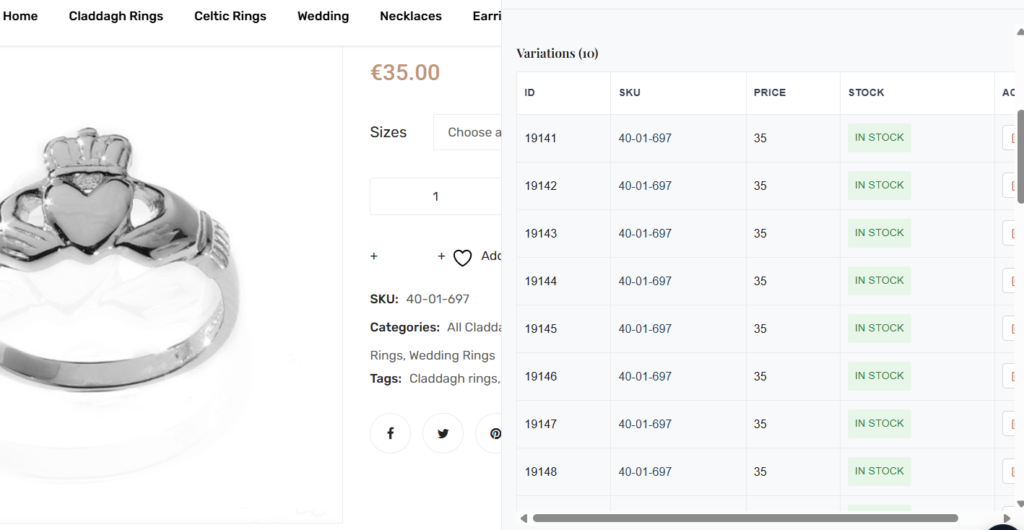
Woo Dev Tools is a Chrome extension that gives WooCommerce developers instant access to structured product data directly from the frontend.
- No backend plugins.
- No admin navigation.
- No unnecessary context switching.
Built to reduce debugging friction during real WooCommerce projects.
Why Woo Dev Tools Exists
When working with WooCommerce, developers constantly switch between:
- Frontend product pages
- WordPress admin
- Variation edit screens
- Browser DevTools
Especially with products that have 20+ variations, finding the correct variation ID, SKU, stock state, or image quickly becomes repetitive and time-consuming.
Woo Dev Tools solves this by exposing structured product data instantly – in a clean inspection panel.
Core Features
Product Inspector
- Product ID (Post ID)
- Product type (Simple / Variable)
- SKU
- Structured price (Regular & Sale)
- Stock status
- Quick “Edit Product” link
Everything you need at a glance.
Variation Inspector
- Full variation table view
- Variation ID
- SKU
- Price
- Stock status
- Image reference
- Copy-to-clipboard buttons
- Instant visibility of all variations (even 20+)
No expanding rows in admin.
No hunting for variation IDs.
No guesswork.
Product Image Reference
- Main image URL
- Gallery image links
- Quick open-in-new-tab option
- Copy link functionality
Helpful for debugging:
- Incorrect image assignments
- CDN issues
- Variation image mismatches
- Image loading conflicts
Who Is This For?
Woo Dev Tools is designed for:
- WooCommerce developers
- WordPress agencies
- Technical store managers
This is a developer utility – not a store management plugin.
How It Works
Woo Dev Tools reads structured data directly from the WooCommerce frontend output.
It does not:
- Modify backend data
- Access private APIs
- Store or transmit data externally
- Inject tracking scripts
Everything runs locally in your browser.
Privacy & Data Policy
Woo Dev Tools does not collect, store, or transmit any personal data.
All processing happens locally within your browser.
- No analytics.
- No tracking.
- No external data sharing.
Detailed Privacy Policy can be found here.
Roadmap
Planned improvements include:
- Live variation selection monitor
- AJAX request inspector
- Cart debugging tools
- Performance snapshot tools
- Advanced filtering for large variation sets
Have a feature request? I’d love to hear it.
Install Woo Dev Tools
Available on the Chrome Web Store:
👉 [Install Woo Dev Tools]
Suggest a Feature or Report an Issue
Found a bug? Missing something?
Tell me what frustrates you most when debugging WooCommerce.
Submit the form below, or you can directly email me abidkakkur11@outlook.com
Built by a WooCommerce Developer
Woo Dev Tools was built to solve real debugging pain encountered during WooCommerce development projects.
If you find it useful, consider leaving a review on the Chrome Web Store – it helps the project grow.