Migrate image metadata from Elementor to Bricks without the manual work.
A free, lightweight WordPress plugin that helps you migrate Image Title, Alt Text, Caption, and Description when rebuilding a WordPress website from Elementor to Bricks Builder.
No database connection. No complicated API setup. No automatic guessing.
Export from the old site → Import to the new site → Visually match → Copy metadata.
The problem
Moving a WordPress website from Elementor to Bricks often means rebuilding pages and reusing or replacing images.
The problem is that the new website may have completely different media attachment IDs, filenames, or image versions.
That makes migrating image metadata difficult.
You may have hundreds of images with carefully maintained:
- Image Titles
- Alt Text
- Captions
- Descriptions
Manually transferring all of this information is slow and error-prone.
And automatically matching images isn’t always reliable.
An image may have been:
- Renamed
- Re-uploaded
- Cropped
- Replaced
- Optimized
- Given a different filename
That’s why this plugin uses a visual, manual matching workflow instead of blindly assuming two images are the same.
How it works
The plugin is designed specifically for a production → staging migration workflow.
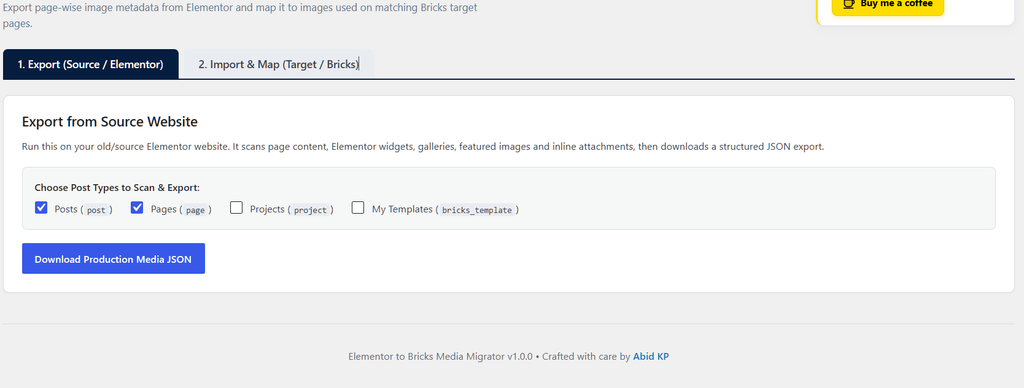
1. Export from your Elementor website
Install the plugin on your existing production website.
The plugin scans your selected post types and detects the images actually used on each page, including images inside Elementor content.
It then creates a JSON export containing the page/image relationships and metadata.
2. Import into your new website
Install the same plugin on your new Bricks website.
Upload the JSON file generated from the production site.
The plugin uses the page URL/path to find the corresponding page on the new website.
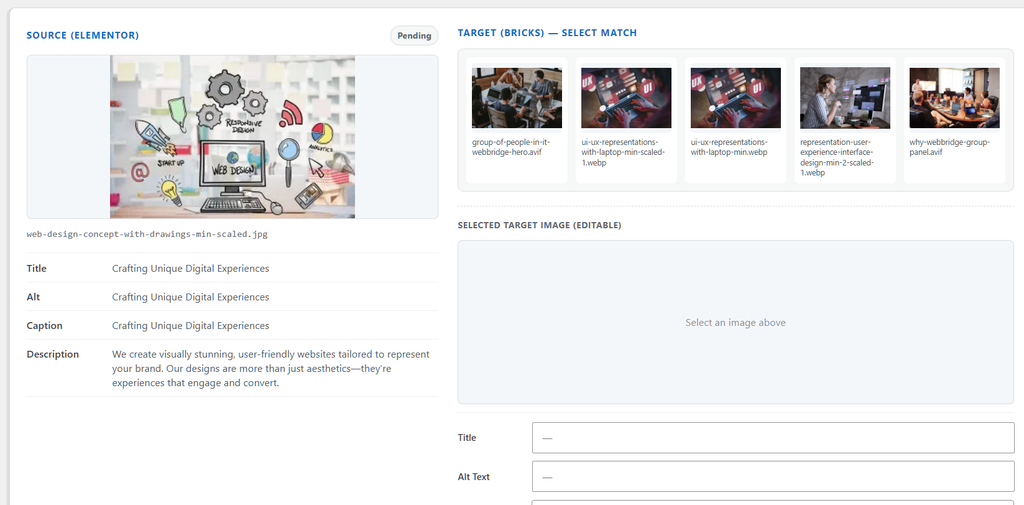
3. Compare the images visually
The plugin detects the images being used on the corresponding Bricks page.
You can then see the source and target images together and manually select the correct match.
No guessing.
No automatic replacement.
You remain in control of every mapping.
4. Copy the metadata
Once you’ve selected the matching image, copy the production metadata to the target image.
The plugin migrates:
Title
Alt Text
Caption
Description
The actual image file is never replaced or deleted.
Key Features
Elementor-aware production scanning
The exporter understands Elementor’s page structure and can detect images used inside Elementor widgets, galleries, carousels, repeaters and other nested content.
It can also detect featured images and regular WordPress content images.
Bricks-aware target scanning
On the new website, the plugin detects images used by Bricks pages, including images stored inside nested Bricks elements and supported image/background configurations.
This means you aren’t searching through your entire Media Library just to find an image that belongs to one particular page.
Page-by-page migration
Images are associated with the pages where they are actually used.
For example:
/drain-cleaning/

Production
├── drain-cleaning-banner.jpg
├── van.jpg
├── drain-camera.jpg
└── technician.jpg

↓

Staging
├── drain-cleaning-new.jpg
├── greenday-van.webp
├── camera.webp
└── technician-new.webp
You simply identify the matching images.
Manual matching instead of risky automation
The plugin intentionally doesn’t automatically decide that two images are the same.
This is important when images have been renamed, cropped, replaced or re-uploaded during a redesign.
You make the final decision.
Metadata-only migration
The plugin changes only the metadata of the selected target attachment:
- Title
- Alt Text
- Caption
- Description
Your actual image files remain untouched.
No direct connection between websites
The production and staging websites don’t need to communicate with each other.
The workflow uses a JSON export:
Production
     ↓
JSON Export
     ↓
Download
     ↓
Staging
     ↓
Import & Map
This makes the migration process simple and keeps the two websites isolated.
Built for Elementor → Bricks migrations
The plugin was created specifically to solve a common problem when rebuilding WordPress websites with Bricks.
If you’re moving from:
Elementor → Bricks
and your new website has different media attachment IDs, this tool can save hours of manually copying image metadata.
It can also be useful for other WordPress rebuild and migration workflows where the source and target websites contain different media libraries.
Security & Performance
The plugin is designed to be used by WordPress administrators.
It includes:
- Administrator capability checks
- WordPress nonces
- Secure JSON validation
- Protected imported data
- Non-destructive metadata migration
- No remote API connection
- Efficient image lookup
- No modification of image files
The current project targets WordPress 6.0+ and PHP 7.4+ and is released under GPL-2.0-or-later.
Who is this for?
WordPress Developers
Useful when rebuilding existing WordPress websites with Bricks.
Freelancers & Agencies
Save time when migrating client websites from Elementor to Bricks.
Website Owners
Keep existing image metadata when moving to a redesigned website.
SEO Professionals
Preserve existing image Alt Text and other metadata during a website rebuild.
Example Workflow
Old website
WordPress + Elementor
↓
Export media information
↓
JSON file
↓
Import into new website
↓
WordPress + Bricks
↓
Find matching page
↓
Visually match images
↓
Copy metadata
↓
Done
Free & Open Source
Elementor to Bricks Media Migrator is free to use, modify and distribute under the GPL-2.0-or-later license.
The project is developed and maintained by Abid KP.
Download
Get the plugin
Download the latest version from GitHub and install it on your WordPress website.
Download Elementor to Bricks Media Migrator
Frequently Asked Questions
Does this migrate the actual images?
No. The plugin is specifically for metadata migration. Your existing target images remain untouched.
What metadata does it migrate?
It can migrate:
- Title
- Alt Text
- Caption
- Description
Does it automatically match images?
No. The plugin shows the images used on the corresponding pages and lets you manually choose the correct target image.
Do I need API access between the two websites?
No. The production site generates a JSON file which you manually upload to the target site.
Does it work with Elementor?
Yes. Elementor is the primary source/builder supported for production scanning.
Does it work with Bricks?
Yes. Bricks is supported as the target builder, allowing the plugin to detect images used on the corresponding Bricks pages.
Will it modify my image files?
No. Only the selected attachment metadata is updated.
Is it free?
Yes. The project is open source and released under GPL-2.0-or-later.